The week, every Friday
Managers get the agent’s week in one message: what was raised and cleared, what is still red, the oldest item open, what the team did about it, and which insurer is slowest to pay.
Built for UK insurance repair contractors
ScopeCare Pro times every claim against its service level clocks and checks every estimate against the insurer’s margin floor. The policyholder gets a link to follow their claim, the adjuster gets the specification from the same screen, and the Control Agent checks every live claim each hour through the day.
£79 a month per office seat on annual billing, ex VAT. Start with one. No setup fee.
What the platform enforces
Stop losing margin to extra work nobody priced and service levels nobody watched. General job software records what happened. ScopeCare Pro decides what is allowed to happen next.
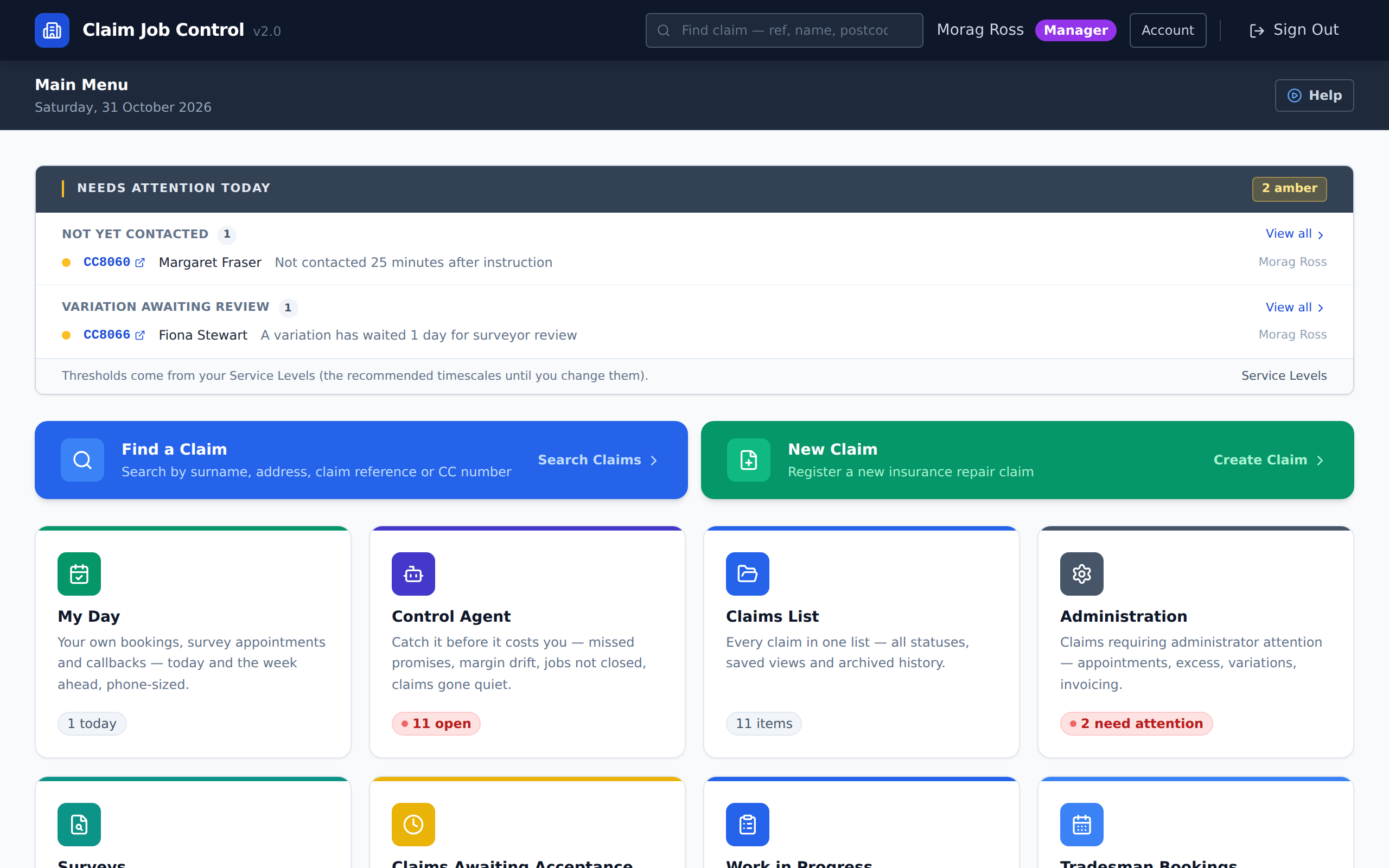
The clock starts the moment a claim is entered: amber at fifteen minutes, red at two hours, on the worklists and the dashboard, until a call or the introduction letter is logged. A manager can change the timings, and set different ones for an insurer or a loss adjuster.
The cost it stops: The insurer rings to ask why nobody has spoken to the policyholder.
The button to book the survey does not appear until a call is logged or the letter has gone, and the server refuses any survey booking that tries to get round the screen, a manager’s included. There is no exception, not even for emergencies.
The cost it stops: A surveyor drives out to a policyholder nobody has spoken to.
Every insurer has its own minimum margin, fixed on the claim when it arrives. The estimate is checked against it while the surveyor prices the job, again before a manager accepts it, and against actual cost while the works run. A job below the floor stays red. The insurer never sees your margin.
The cost it stops: A reinstatement makes nothing, and the accountant finds it months later.
Extra work is a variation: priced, reviewed by the surveyor, marked when it goes to the insurer, and open on the claim until the insurer’s answer is recorded.
The cost it stops: Rotten joists under the floor, the work carried on, and nobody told the adjuster.
Every change to a quantity, rate or price is recorded: who, when, before and after. Once an estimate is accepted, it locks for everyone below manager, and a manager’s override is recorded like any other change.
The cost it stops: A rate on an accepted estimate changes, and nobody can say who changed it.
The introduction letter and the appointment confirmation go from the claim, each with a link where the policyholder follows the job in plain words. Switch on the automatic chase and a policyholder nobody can reach is emailed to ask them to call.
The cost it stops: The office spends the morning answering “where are we with my claim?”
Operational watchdog
It checks every live claim each hour through the day. Fixed rules decide what is flagged:
It never changes a claim or sends anything without a person.
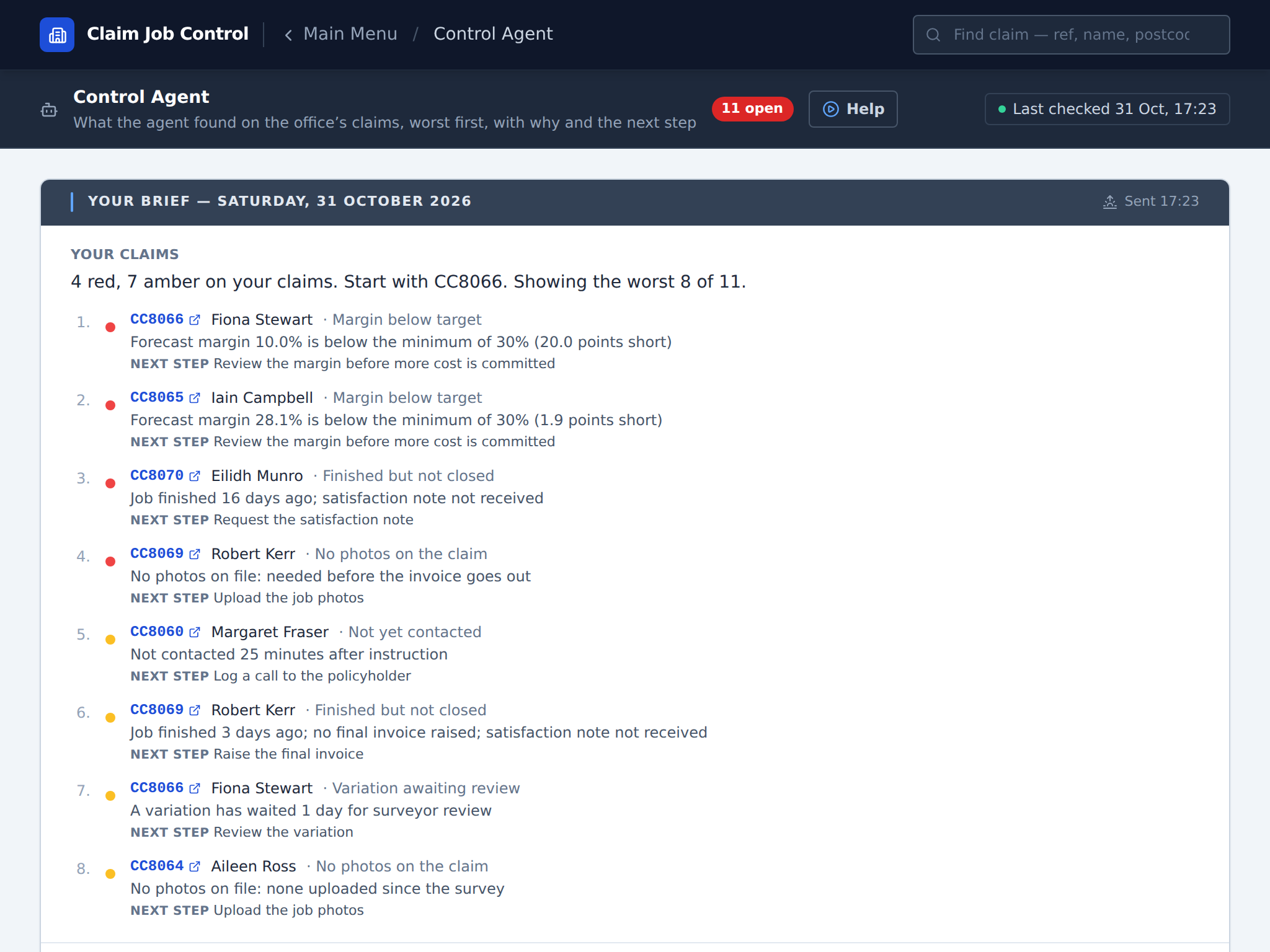
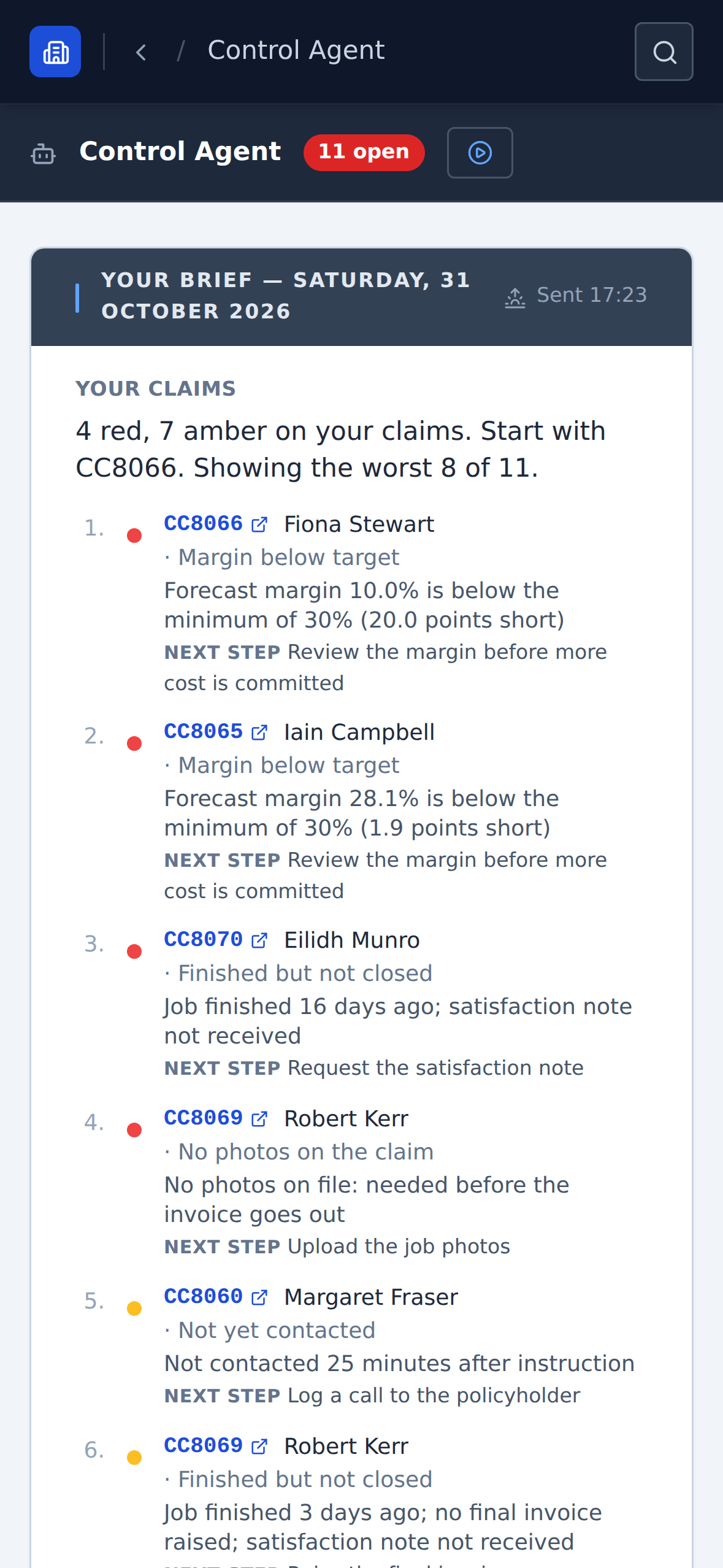
At 07:00, or the hour you choose, each surveyor and works controller finds their own claims that need them, worst first, in the app. Managers also see the whole office. If nothing needs you, nothing is sent.
Each finding says what was found, why, and the next step, with the claim one click away. Snooze it and, if it is still true, it comes back by itself.
On an overdue invoice or an unpaid excess, one click drafts the chase. Someone in the office reads it, can change it, and sends it. The agent never emails an insurer or a policyholder itself.
The AI wording is off until a manager switches it on, and it never works out money. It is given figures the system has already worked out; wording that carries a number they do not hold is thrown away, and the agent’s own words stand.
Managers get the agent’s week in one message: what was raised and cleared, what is still red, the oldest item open, what the team did about it, and which insurer is slowest to pay.
Mark a “claim gone quiet” or “no photos” alert not useful and a repeat amber on that claim stays quiet for thirty days, with a note of who decided. A red, a Service Level clock or a money alert is never kept quiet.
An overdue-invoice alert shows how that insurer pays you: the median days to pay against its terms, from how many invoices, and how many are unpaid past terms.
One claim, instruction to site
Take a roof job. These are the service levels the firm it was built in worked to, and the platform times every claim against the same ones. A step turns amber before anyone has to be reminded of it.
Slates off a roof, rain in the back bedroom. The office keys the claim in, or starts it from the adjuster’s PDF, and it lands on the Administration worklist with its first-contact clock already running.
The policyholder is rung and the call logged inside fifteen minutes. The row turns green and the introduction letter goes out with a link where the policyholder can follow the claim.
Strip out, drying and reinstatement written up room by room on the claim record while the surveyor is still in the house.
£4,850 obtained, £3,214 cost, 33.7%. This insurer’s floor is 30%, so the margin panel is green. At 27% the estimate’s profit check turns red, and once the job is accepted it sits under Below Target Margin on the profit and loss until someone fixes it.
Agreed Friday, on site Tuesday: four days into the seven-day works-start clock. Actual cost sits beside the estimate, so a job going over shows the week it happens.
Every worklist is colour-coded against these clocks. Amber means act today. Red means the insurer who sent the job may already have noticed.
Built by people who ran this work
We started with two of us and a van, doing storm damage and escape of water for insurers and loss adjusters. Every time a job cost us money, a rule went into the system. By the end there were seventy of us, thousands of claims a year, and we knew the margin on every job while it was still running.
When we sold the firm, the buyer was not paying for vans. The buyer was paying for an office that answered every instruction inside fifteen minutes and never priced a job below the insurer’s floor. That office is what ScopeCare Pro gives you.
Read the full story From Access to the webThe firm’s service levels
Four desks, one claim record
The badges on it are the day’s work. They clear when the work is done, or they stay.
Every instruction not yet contacted, oldest first, with its clock beside it. Calls and letters are logged from the row, and every callback the office promises is logged on one list that stays red until it is back to zero.
A personal worklist against the 48-hour clock. The specification is written on the claim with the margin panel beneath it, and the letter to the adjuster is sent from the same screen.
Trades booked, variations tracked from request to the insurer’s decision, and the margin checked again against actual cost while the works run.
The manager’s desk: which invoice is overdue, which insurer owes it and how many days since the job finished, with unpaid excesses one filter away. Aged debt by band is on the profit and loss screen. Nothing leaves the list until the money lands.
Managers see all four. Profit and loss by job sits beside them, worst margin first, with ten management reports under it, every one exportable to CSV for the accountant. Managers can also download the last ninety days of issued invoices as files laid out for QuickBooks Online’s invoice import, within its import limits (a ZIP of files when there are more), and a payments file for recording the payments by hand.
The platform runs in the browser on any device and installs on a phone or tablet, so a tradesman has the day’s jobs in their hand on the step.
Pricing
Every office seat gets the whole platform. What each person sees follows the level you give them.
On annual billing, ex VAT · £95 a month billed monthly
Expert help is on hand. If you need a hand setting up, email us; if it needs a conversation, book a call.
Before you commit
No. You pay for your seats and nothing up front beyond them. You can set yourself up: look round with the sample claims first, add your insurers and staff, and set your hourly rate for each trade. Your own claims start when you subscribe, and that includes bringing your open claims in from a spreadsheet. Expert help is on hand: if you need a hand setting up, email us through the contact form, and if it needs a conversation, book a call. Prices exclude VAT, which is added where it applies.
It never works them out, and it cannot change them. Fixed rules find what needs attention, and every figure comes from your own records. The AI wording is off until your manager switches it on; then the model may only put the rules’ findings in order and in words, and anything it writes with a number your records do not hold is thrown away for the agent’s own wording. It never edits a claim or sends an email. Like any AI it can still word something badly, which is why a person reads every chase email the agent drafts before it goes.
It can replace your own estimating spreadsheet: surveyors price room by room in the Estimate Builder at your own rates, and every estimate is checked against the insurer’s margin floor. If an insurer makes you price in its own estimating system, keep it: upload the adjuster’s Xactimate scope PDF and it becomes the estimate you work from. So far the import has been tested on real US Xactimate PDFs and no UK file has been tried yet: bring one to the demo and we will try it with you. There is no live link back to those systems yet.
No. ScopeCare Pro runs in the web browser on the computers, tablets and phones you already have, and installs on a phone or tablet like an app. Your team signs in with a code sent to their email, so there are no passwords to manage. We host it in Ireland, back it up every day and keep it up to date: there is nothing to install on a server.
Yes. An office seat is £95 a month on monthly billing, or £79 a month if you pay for the year. The minimum term is three months; after that a monthly plan rolls month to month and you can cancel with a month’s notice.
Look round before you pay anything: 30 days on your own account with the sample claims, no card. There is no setup fee, so nothing is paid up front beyond your seats, and the minimum term is three months. After that a monthly plan rolls month to month, and a manager can download all your data whenever you like, and for 30 days after you leave.
Yes, at any time. A manager downloads a complete export from inside the system: your records as CSV files that open in Excel, with your photographs and documents. The download still works for 30 days after you leave. Your data is never a reason to stay.
Try it on your own account
Create your company in two minutes with an email code and look round for 30 days, no card. Press Load sample claims and the office fills with twelve claims across the whole lifecycle. Open the one nobody has contacted and try to book a survey. The button is not there. Your own claims start when you subscribe.
Your data
The full list of what runs where, and who the sub-processors are, is on the security page.
Book a demo
Instruction to final invoice, live in the system, with the clocks running and the margin gate on. No slides. Bring your most difficult job and see where the platform would have caught it.
Office seats £79 a month billed annually, or £95 monthly, one for each office user, starting with one · £15 field seats · no setup fee · data held in Ireland, encrypted and backed up · The full price list